Unified Payments Interface (UPI)
UPI is India's interoperable instant-payment interface for sending, receiving, and requesting account-to-account payments through participating apps and institutions.
Unified Payments Interface (UPI) is India’s interoperable instant-payment interface for sending, receiving, and requesting money between eligible accounts through participating banks and payment applications. The National Payments Corporation of India (NPCI) developed UPI and operates the system framework, while banks and payment service providers authenticate users, route instructions, debit and credit accounts, and handle customer service.
UPI is not simply a mobile wallet or one application. It is a payment interface connecting multiple participants. A UPI app may let a user select a linked bank or other permitted account, identify a recipient by UPI ID, QR code, or supported bank details, and authorize a payment without disclosing full account credentials to the recipient.
Key Takeaways
- UPI is an interoperable payment interface, not a single app, bank, or stored-value balance.
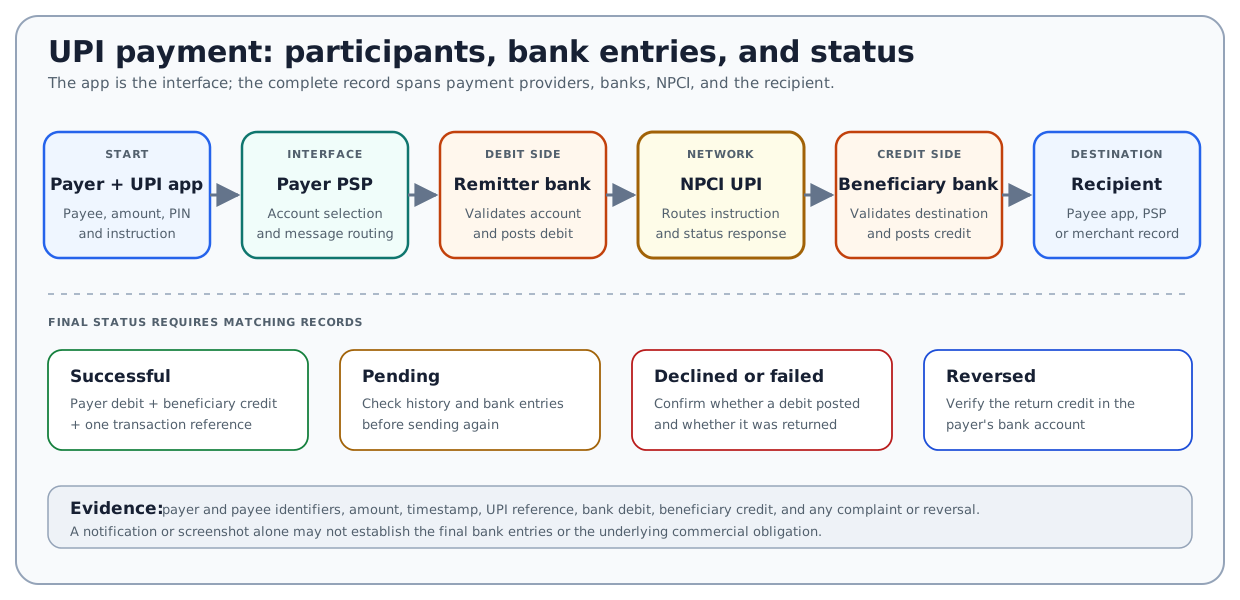
- A transfer can involve the payer, payer app or PSP, remitter bank, NPCI, beneficiary bank, and payee app or PSP.
- UPI supports both push payments, initiated by the payer, and collect requests, which the payer must review and approve or reject.
- A UPI PIN authorizes a debit; it is not needed merely to receive an ordinary payment.
- “Initiated,” “pending,” “successful,” “declined,” “debited,” “credited,” and “reversed” describe different records and should not be treated as synonyms.
- Limits, fees, eligible funding sources, and available features can vary by participant, account, transaction type, and current rules.
How UPI Works
NPCI describes UPI as an instant-payment system built over India’s Immediate Payment Service infrastructure. That relationship does not make UPI merely another name for IMPS. UPI adds interoperable app, payment-address, QR, request-to-pay, and participant rules around the underlying transfer capability.
A typical UPI payment includes these roles:
| Participant | Main role | Record to check |
|---|---|---|
| Payer | Reviews the recipient, amount, and purpose and authorizes the debit | App confirmation, bank debit, and reference number |
| UPI app and payer PSP | Provides the interface, identifies the payer’s account, and sends the authenticated instruction | App transaction history and complaint record |
| Remitter bank | Holds the payer’s account and accepts or rejects the debit | Payer bank statement and transaction status |
| NPCI | Routes messages within the UPI system and supports network rules and transaction-status processes | UPI transaction reference and network status |
| Beneficiary bank | Receives the instruction and credits or rejects the destination account | Beneficiary account credit or rejection record |
| Payee PSP or app | Supports the recipient’s UPI identifier, merchant integration, or customer interface where applicable | Payee app or merchant payment record |
One institution may perform more than one role. For example, a bank can provide the user’s app, act as the payer PSP, and hold the remitter account. A third-party app can provide the customer interface while a partner bank performs regulated PSP functions. The app brand alone therefore does not identify every party responsible for a delayed or disputed payment.
UPI IDs, QR Codes, and Account Details
A UPI ID, also called a virtual payment address or VPA, is an alias mapped through a participating provider to an eligible account. It often resembles name@provider, although actual handles and formats depend on the provider. The alias can reduce the need to disclose an account number and IFSC to the payer.
Common ways to identify a destination include:
- a UPI ID or VPA;
- a merchant or personal QR code;
- bank account number and IFSC;
- a saved or app-supported contact identifier; and
- an app deep link or merchant checkout request.
An identifier makes routing easier, but it does not prove the commercial purpose of a payment. Before authorizing, the payer should compare the displayed recipient name, amount, and request details with an independently verified invoice, conversation, or merchant checkout.
Push Payment
In a push payment, the payer starts the instruction:
- The payer enters or scans the recipient identifier.
- The app retrieves or displays available recipient information.
- The payer enters the amount and reviews the recipient and purpose.
- The payer authorizes the debit through the prescribed authentication process.
- The remitter bank, NPCI, and beneficiary bank process the instruction.
- The payer and recipient receive status information through their respective channels.
The payer should not assume that a spinning screen, timeout, or missing notification means no payment occurred. The bank entry and transaction reference should be checked before retrying.
Collect Request
In a collect request, a person or merchant sends a request for the payer to approve a debit. The request itself does not transfer money. The payer must inspect the requester, amount, note, and expiry information and then approve or reject it.
This distinction is central to UPI fraud prevention. Entering a UPI PIN in response to a collect request generally authorizes money to leave the payer’s account. A person does not need to enter a UPI PIN merely to receive an ordinary incoming payment. An unexpected request, QR code, screen-sharing instruction, or supposed “refund” should be treated as a debit risk until independently verified.
Specialized features, including mandates, UPI Lite, credit products, or device-specific payment modes, may use different funding and authorization arrangements. Their product rules should not be inferred from the core bank-account payment flow.
Worked Example: Paying an Invoice
Assume a small retailer owes a local supplier INR 2,400. The supplier sends an invoice showing the fictional UPI ID greenmarket@psp. The retailer verifies the invoice using a known contact method and starts a push payment.
| Record | Expected information |
|---|---|
| Invoice | Supplier identity, invoice number, and INR 2,400 due |
| App review screen | Displayed payee name, UPI ID, amount, and note |
| Payer bank record | INR 2,400 debit after successful authorization |
| UPI record | Unique transaction reference, timestamp, and status |
| Beneficiary bank record | INR 2,400 credit to the intended account |
| Supplier ledger | Payment applied to the correct invoice |
If the app says “successful” and both bank records agree, the payment evidence is strong. The supplier must still apply the receipt to the correct invoice. A successful transfer proves that money moved to the recorded destination; it does not by itself prove that the goods were delivered, the invoice was valid, or the payee will issue a refund.
Example: Debited but Not Credited
Suppose a customer sends INR 6,000. The payer’s bank account is debited, but the recipient reports no credit and the app shows a pending or unclear status.
The payer should preserve:
- the UPI transaction reference or retrieval reference number;
- payer and recipient identifiers;
- amount, date, and timestamp;
- payer bank debit;
- displayed transaction status;
- recipient account evidence where available; and
- complaint and reversal references.
The payer should first refresh or check the transaction history and use the complaint channel in the participating app or bank. Sending another INR 6,000 before determining the first instruction’s status could create a duplicate payment.
Transaction Status and RBI Timelines
UPI status language should be read carefully:
| Status or event | What it may mean | Appropriate check |
|---|---|---|
| Initiated | The instruction was submitted | Look for authorization, debit, and network response |
| Successful | The system reports completion | Match the payer debit, beneficiary credit, and reference |
| Pending | One or more final records are not yet available | Check history and bank records before retrying |
| Declined or failed | The instruction was rejected or could not complete | Confirm whether any debit occurred and whether it reversed |
| Debited, not credited | Payer debit exists without the expected beneficiary credit | Raise a complaint with the reference and both account records |
| Reversed | An earlier debit was returned | Verify the actual credit in the payer’s bank account |
The Reserve Bank of India’s September 20, 2019 failed-transaction framework distinguishes two UPI cases for domestic transactions. If a funds transfer debits the payer but does not credit the beneficiary, the framework prescribes credit or auto-reversal by T + 1 day. If a merchant payment debits the account but confirmation does not reach the merchant, it prescribes auto-reversal within T + 5 days. T is the calendar date of the transaction. The circular also specifies compensation for delay beyond the applicable timeline.
These are regulatory timelines for defined failed-transaction cases, not a promise that every dispute, scam, wrong-recipient payment, refund, chargeback, or merchant-service complaint will be resolved on the same schedule. Users should follow the current bank, app, NPCI, and RBI complaint process applicable to the facts.
UPI PIN and Fraud Controls
The UPI PIN is the passcode used to authorize covered account transactions. It should be entered only in the authorized UPI interface and never disclosed to a caller, merchant, courier, alleged support agent, or person offering a refund or prize.
Practical controls include:
- verify the payee name and amount before entering the PIN;
- reject unexpected collect requests;
- do not scan a QR code to “receive” an ordinary payment;
- do not install remote-access software or share a screen at a stranger’s request;
- use official app, bank, and NPCI support channels;
- report an unauthorized transaction to the bank promptly; and
- secure or block the mobile number, device, and account access after loss or theft.
Device binding, app controls, two-factor authentication, bank monitoring, and network rules reduce specific risks, but none guarantees that a user cannot be deceived into authorizing a valid-looking debit. Authentication confirms use of credentials; it does not independently validate the underlying purchase, investment, loan, job offer, or refund story.
UPI Compared With Other Payment Methods
| Method | Primary model | Main distinction |
|---|---|---|
| UPI | Interoperable interface connecting eligible accounts | Commonly uses apps, UPI IDs, QR codes, and push or collect instructions |
| IMPS | Immediate interbank transfer service | Bank-led transfer service with several supported identifiers and channels |
| Card payment | Authorization against a card account through an acquiring and card-network route | Merchant acceptance, card credentials, clearing, and dispute rules differ from UPI |
| Mobile wallet | Software interface that may store value or payment credentials | The wallet can use a card, bank account, token, or stored balance rather than UPI alone |
| NEFT | RBI-operated electronic funds transfer system | Uses a different operating and settlement framework and commonly uses account and IFSC details |
The methods can overlap at the user interface. A mobile wallet may present UPI alongside cards or stored value, and a bank app may offer both UPI and other bank transfer methods. An eligible RuPay credit card can also fund supported UPI merchant payments without becoming an ordinary bank-account UPI transfer. The selected funding source and rail determine the relevant records and rules.
Fees, Limits, and Availability
UPI operates around the clock at the system level, but a particular transaction can still be affected by participant downtime, fraud controls, account status, beneficiary validation, or technical failure. A provider may also restrict features during maintenance or after repeated failed authentication.
Do not treat one published limit or fee as universal. Transaction caps and charges can depend on the bank, app, account, user status, merchant category, payment purpose, funding source, and current NPCI or RBI rules. Some specialized categories have different limits from ordinary person-to-person payments. The amount and any charge displayed by the relevant provider should be reviewed before authorization.
How Businesses Should Reconcile UPI Payments
Businesses should connect each UPI receipt to the underlying order, invoice, customer, and bank credit. A screenshot sent by a customer is weaker evidence than the merchant’s own app, acquiring, bank, and settlement records.
For each material payment, retain or reconcile:
- merchant identifier and bank account;
- order or invoice number;
- payer-provided reference where relevant;
- UPI transaction reference and timestamp;
- gross payment, fee, refund, and net bank credit;
- success, failure, reversal, or dispute status; and
- any customer-service case or adjustment.
This separation helps identify duplicate payments, fake screenshots, payments applied to the wrong invoice, delayed credits, partial refunds, and settlement differences.
Risks and Common Mistakes
- Treating UPI as one app or assuming the visible app provider holds both bank accounts.
- Calling UPI a stored-value wallet without checking the actual funding source.
- Entering a UPI PIN to supposedly receive money or approve a refund.
- Approving a collect request without checking the requester and amount.
- Retrying a pending payment before checking the original reference.
- Assuming a successful payment can be stopped or reversed on demand.
- Confusing a payment dispute with a dispute about undelivered goods or services.
- Relying on an old fee, limit, app procedure, or complaint timeline.
- Sharing a PIN, one-time code, card detail, or screen with alleged support staff.
- Treating authentication as proof that the underlying transaction was legitimate.
Official Resources
- NPCI: Unified Payments Interface provides the official product overview, participant information, and current UPI notices.
- NPCI: UPI frequently asked questions explains UPI IDs, PINs, channels, account linking, payment status, and complaint access.
- NPCI: Register a complaint provides a route for checking supported transaction records and sending complaints to the relevant member institution; suspected fraudulent or unauthorized transactions should be raised with the user’s bank.
- Reserve Bank of India: Failed-transaction turnaround times sets the framework for auto-reversal and compensation in specified failed domestic payment transactions.
- Reserve Bank of India: Complaint Management System provides the current route for eligible complaints under the applicable RBI ombudsman framework after required prior steps.
Product features and regulatory requirements can change. Use current NPCI, RBI, bank, and app information when a payment, complaint, or legal conclusion matters.
FAQs
Is UPI a mobile wallet?
Do I enter a UPI PIN to receive money?
Can a successful UPI payment be cancelled?
What should I do when a UPI payment is pending?
Related Terms
- National Payments Corporation of India (NPCI): Organization that operates UPI and other Indian retail-payment systems.
- Immediate Payment Service (IMPS): NPCI-operated immediate account-transfer service underlying important parts of the UPI framework.
- RuPay: NPCI-operated card scheme whose eligible credit cards can fund supported UPI merchant payments.
- Mobile Payments: Payments initiated, authenticated, or presented through a mobile device or service.
- Digital Payments: Broader category of electronically initiated or processed payments.
- Bank Transfer: Movement of funds from one bank account to another through an applicable transfer system.
- Authentication: Process used to verify a user or credential before allowing an account action.
Educational Use
This article provides general financial education. It is not a recommendation to use a particular UPI app or payment method and is not banking, payment-security, legal, regulatory, accounting, or dispute-resolution advice.